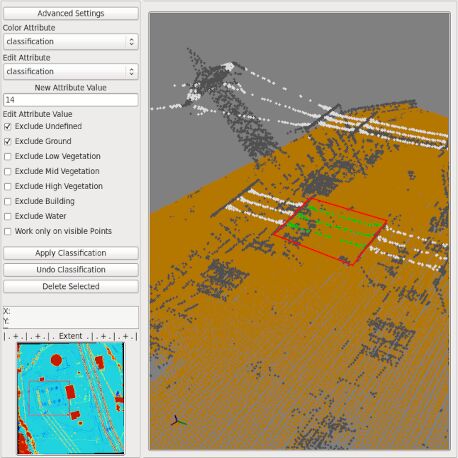

LIS Point Cloud Editor
LIS Point Cloud Editor provides an interactive 3D environment for inspecting, editing and validating point cloud data. Users can select points, modify classifications or other attributes, remove erroneous points, perform distance measurements and fit planes to derive surface orientations. Typical applications include manually correcting ground or vegetation classifications, removing remaining noise after automated filtering, inspecting problematic areas of a LiDAR dataset, measuring building or object dimensions, and determining the orientation of geological surfaces from selected points.
Tool: Point Cloud Editor
| Features |
|---|
| • 3D point cloud viewer and editor |
| • view of rectangular subsets and transects (with predefined swath width) |
| • measurement of point distances |
| • rectangular and polygonal selections |
| • point (classification) relabeling |
| • point deletion |
| • digitization of polygons, plane fitting, and report of plane orientation (output is a 3D polygon shapes layer with attributes) |
| • optional visualization of grid data sets and a 3D shapes layer (either points, lines, or polygons) together with the point cloud |
| • optional color draping of grid data layers, e.g. orthophoto over DSM |
| • point attribute value report on mouse-over |
| • manifold colorization options, including RGB, classification, Eye-Dome Lighting, attribute- and normal-based shading, random, x-ray transparency |
| • image sequencer |
| • point cloud exaggeration |
| • anaglyph mode |
| • effective and efficient working because of a lot of shortcuts: switching of color palettes, showing/hiding certain point classes, editing only certain point classes ... |
| Applications |
|---|
| • 3D point cloud visualization and inspection |
| • animation creation (fly-through) |
| • point cloud editing (classification refinement, noise removal, point labeling) |
| • distance measurements |
| • structural geology (joint plane orientations) |
| • visualization of point clouds, raster data sets and 3D shapes layers |
Tool: Point Cloud Editor (Map) [interactive]
| Features |
|---|
| • special version of the "Point Cloud Editor" tool, see above |
| • selection of the area-of-interest (AOI) from a large point cloud dataset in a Map View |
| • facilitated navigation and editing of large point clouds |
| Applications |
|---|
| • 3D point cloud visualization and inspection |
| • point cloud editing (classification refinement, noise removal, point labeling) |
| • distance measurements |
| • structural geology (joint plane orientations) |
| • visualization of point clouds, raster data sets and 3D shapes layers |